cloudNet@ 팀의 가시다 님이 진행하는 쿠버네티스 CI/CD 스터디 1주차 내용입니다.
Kustomize란?
Kustomize란?
템플릿이나 별도 DSL 없이 Kubernetes YAML에 수정 및 변형을 관리하도록 도와주는 구성 관리 도구이다.
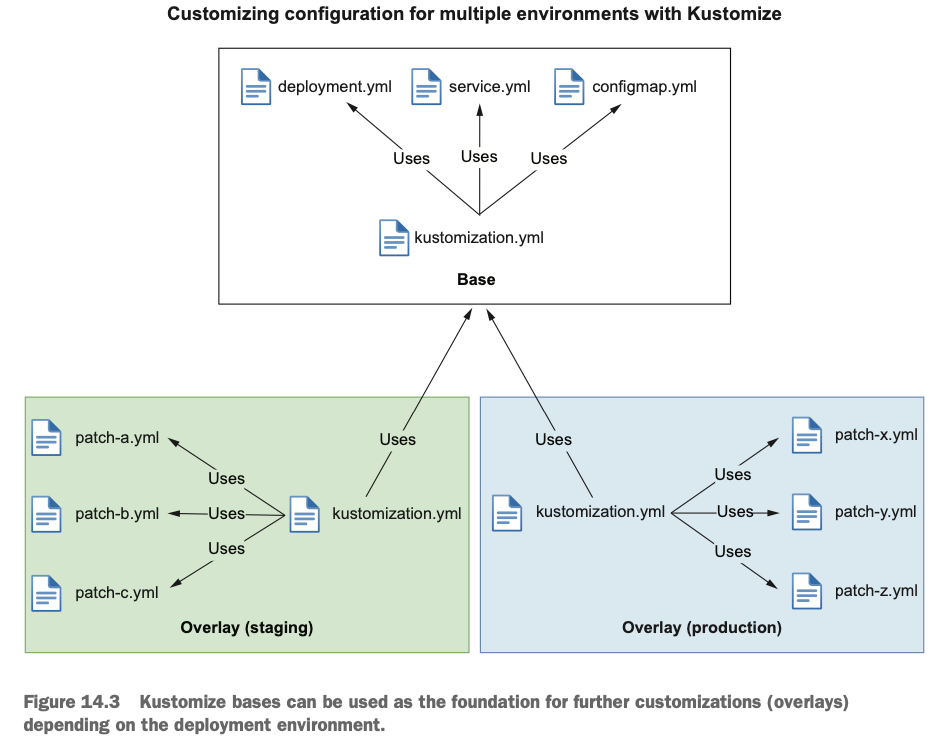
- 변하지 않는 공통 매니페스트(Base) 와 환경별 차이만 담은 오버레이(Overlay) 를 분리해, 작은 변경을 안전하고 반복 가능하게 만들자는 것이다.
Kustomize 구조
Kustomize는 기존 Application의 근원이 되는 부분인 base와 base에 변경되는 사항을 정의하는 overlays로 나뉘어 있다.
- Base: 공통 리소스(deployment.yaml, service.yaml)가 정의된 디렉토리
- 오버레이에 대한 정보는 갖지 않는다 → 독립적이며, 여러 오버레이에서 재사용 가능하다.
- Overlay: 특정 환경에 필요한 차이점만 정의한 디렉토리(이미지 태그, replicas, ConfigMap/Secret, 패치 등).
- 자신의 kustomization.yaml에서 하나 이상의 Base를 참조한다.
Workflow
1. Overlay의 kustomization.yaml이 Base를 참조한다.
2. Kustomize가 Base의 공통 리소스를 가져온다.
3. Overlay의 수정 사항(패치, replicas·등)을 추가하여 최종 매니페스트를 만든다.
├── base
│   ├── deployment.yaml
│   ├── service.yaml
│   └── kustomization.yam
└── overlays
    ├── dev
    │   ├── ingress.yaml
    │   ├── replica_count.yaml
    │   └── kustomization.yaml
    └── prod
        ├── ingress.yaml
        ├── replica_count.yaml
        └── kustomization.yaml
kustomization.yaml
- Base: 해당 디렉토리가 제공하는 리소스와 사용자 지정 항목을 선언한다.
- commonAnnotations, namePrefix, images 등을 통해 공통 정의 가능
- Overlay: 어떤 Base를 참조할지, 어떤 변경을 추가할지를 선언한다.
- base/kustomization.yaml → 공통 리소스
apiVersion: kustomize.config.k8s.io/v1beta1
kind: Kustomization
resources:
  - deployment.yaml
  - service.yaml
commonLabels:
app.kubernetes.io/name: myapp- overlays/staging/kustomization.yaml
apiVersion: kustomize.config.k8s.io/v1beta1
kind: Kustomization
resources:
  - ../../base
patches:
  - path: replica-count.yaml
    target:
      kind: Deployment
      name: nginx-deployment
  - path: ingress.yaml
    target:
      kind: Ingress
      name: nginx-ingress
namePrefix: dev-
namespace: dev-nginx
Kustomize를 사용한 쿠버네티스 리소스 배포
- kustomize의 secretGenerator와 configMapGenerator 생성
- 외부의 설정 파일이나 값(.properties, .env, 키 파일 등)을 읽어 ConfigMap과 Secret 선언적으로 생성한다.
# To generate a ConfigMap from a file, add an entry to the files list in configMapGenerator.
# Here is an example of generating a ConfigMap with a data item from a .properties file:

#
mkdir kustomize-test && cd kustomize-test

# Create a application.properties file
cat <<EOF > application.properties
FOO=Bar
EOF

cat <<EOF > kustomization.yaml
configMapGenerator:
- name: example-configmap-1
  files:
  - application.properties
EOF

# -k 혹은 --kustomize 사용
kubectl create -k ./ --dry-run=client -o yaml --save-config=false
apiVersion: v1
data:
  application.properties: |
    FOO=Bar
kind: ConfigMap
metadata:
  name: example-configmap-1-g4hk9g2ff8
  namespace: default

# 생성 및 확인
kubectl create -k ./ --save-config=false
kubectl get -k ./
kubectl describe -k ./

# ConfigMaps can also be generated from literal key-value pairs.
# To generate a ConfigMap from a literal key-value pair, add an entry to the literals list in configMapGenerator.
# Here is an example of generating a ConfigMap with a data item from a key-value pair:

cat <<EOF > kustomization.yaml
configMapGenerator:
- name: example-configmap-2
  literals:
  - FOO=Bar2
EOF

#
kubectl create -k ./ --dry-run=client -o yaml --save-config=false- Deployment에 적용
# Create an application.properties file
cat << EOF > application.properties
FOO=Bar
EOF

cat << EOF > deployment.yaml
apiVersion: apps/v1
kind: Deployment
metadata:
  name: my-app
  labels:
    app: my-app
spec:
  selector:
    matchLabels:
      app: my-app
  template:
    metadata:
      labels:
        app: my-app
    spec:
      containers:
      - name: app
        image: nginx:alpine
        volumeMounts:
        - name: config
          mountPath: /config
      volumes:
      - name: config
        configMap:
          name: example-configmap-1
EOF

cat << EOF > kustomization.yaml
resources:
- deployment.yaml
configMapGenerator:
- name: example-configmap-1
  files:
  - application.properties
EOF

#
kubectl create -k ./ --dry-run=client -o yaml --save-config=false

#
kubectl  exec -it deployments/my-app -- ls /config
kubectl  exec -it deployments/my-app -- cat /config/application.properties
FOO=Bar

# 삭제
kubectl delete -k ./- secretGenerator생성 후 Deployment 연결
# You can generate Secrets from files or literal key-value pairs.
# To generate a Secret from a file, add an entry to the files list in secretGenerator.
# Here is an example of generating a Secret with a data item from a file:

# Create a password.txt file
cat << EOF > password.txt
username=admin
password=secret
EOF

cat << EOF > kustomization.yaml
secretGenerator:
- name: example-secret-1
  files:
  - password.txt
EOF

kubectl create -k ./ --dry-run=client -o yaml --save-config=false

------------------------------------------
# To generate a Secret from a literal key-value pair, add an entry to literals list in secretGenerator.
# Here is an example of generating a Secret with a data item from a key-value pair:

cat << EOF > kustomization.yaml
secretGenerator:
- name: example-secret-2
  literals:
  - username=admin
  - password=secret
EOF

kubectl create -k ./ --dry-run=client -o yaml --save-config=false

-----------------------------------------
# Create a password.txt file
cat << EOF > password.txt
username=admin
password=secret
EOF

cat << EOF > deployment.yaml
apiVersion: apps/v1
kind: Deployment
metadata:
  name: my-app
  labels:
    app: my-app
spec:
  selector:
    matchLabels:
      app: my-app
  template:
    metadata:
      labels:
        app: my-app
    spec:
      containers:
      - name: app
        image: nginx:alpine
        volumeMounts:
        - name: password
          mountPath: /secrets
      volumes:
      - name: password
        secret:
          secretName: example-secret-1
EOF

cat << EOF > kustomization.yaml
resources:
- deployment.yaml
secretGenerator:
- name: example-secret-1
  files:
  - password.txt
EOF

#
kubectl create -k ./ --dry-run=client -o yaml --save-config=false

#
kubectl  exec -it deployments/my-app -- ls /secrets
kubectl  exec -it deployments/my-app -- cat /secrets/password.txt
username=admin
password=secret

# 삭제
kubectl delete -k ./- generatorOptions 생성
# The generated ConfigMaps and Secrets have a content hash suffix appended.
# This ensures that a new ConfigMap or Secret is generated when the contents are changed.
# To disable the behavior of appending a suffix, one can use generatorOptions.
# Besides that, it is also possible to specify cross-cutting options for generated ConfigMaps and Secrets.

cat << EOF > kustomization.yaml
configMapGenerator:
- name: example-configmap-3
  literals:
  - FOO=Bar
generatorOptions:
  disableNameSuffixHash: true
  labels:
    type: generated
  annotations:
    note: generated
EOF

# annotations, labels, name 확인
kubectl create -k ./ --dry-run=client -o yaml --save-config=false
kubectl create -k ./ --save-config=false
kubectl get -k ./


# 삭제
kubectl delete -k ./
Kustomize 공통 필드 일괄 적용
# Create a deployment.yaml
cat << EOF > deployment.yaml
apiVersion: apps/v1
kind: Deployment
metadata:
  name: nginx-deployment
  labels:
    app: nginx
spec:
  selector:
    matchLabels:
      app: nginx
  template:
    metadata:
      labels:
        app: nginx
    spec:
      containers:
      - name: nginx
        image: nginx:alpine
EOF

cat << EOF > kustomization.yaml
namespace: my-namespace
namePrefix: dev-
nameSuffix: "-82"
labels:
  - pairs:
      app: bingo
    includeSelectors: true
commonAnnotations:
  oncallPager: 02-1234-5678
resources:
- deployment.yaml
EOF

# 출력 deployment 와 오리지널 deployment 비교해보자
kubectl create -k ./ --dry-run=client -o yaml --save-config=false
Kusomize 통합 구성 및 부분 패치
- Composing : 여러 파일에서 리소스를 구성
# Kustomize supports composition of different resources.
# The resources field, in the kustomization.yaml file, defines the list of resources to include in a configuration.
# Set the path to a resource's configuration file in the resources list.
# Here is an example of an NGINX application comprised of a Deployment and a Service:

# Create a deployment.yaml file
cat << EOF > deployment.yaml
apiVersion: apps/v1
kind: Deployment
metadata:
  name: my-nginx
spec:
  selector:
    matchLabels:
      run: my-nginx
  replicas: 2
  template:
    metadata:
      labels:
        run: my-nginx
    spec:
      containers:
      - name: my-nginx
        image: nginx:alpine
        ports:
        - containerPort: 80
EOF

# Create a service.yaml file
cat << EOF > service.yaml
apiVersion: v1
kind: Service
metadata:
  name: my-nginx
  labels:
    run: my-nginx
spec:
  ports:
  - port: 80
    protocol: TCP
  selector:
    run: my-nginx
EOF

# Create a kustomization.yaml composing them
cat << EOF > kustomization.yaml
resources:
- deployment.yaml
- service.yaml
EOF

#
kubectl create -k ./ --dry-run=client -o yaml --save-config=false
kubectl create -k ./ --save-config=false

# 확인
kubectl get -k ./
kubectl describe -k ./

# 변경 확인
kubectl scale deployment my-nginx --replicas 1
kubectl diff -k ./

# 삭제
kubectl delete -k ./- Customizing :사용자 지정 기능을 적용
- patches 필드를 통해 다양한 패치 메커니즘 StrategicMerge , Json6902을 지원한다.
-
patches 필드는 파일 형식이거나 인라인 문자열일 수 있으며, 단일 또는 여러 리소스를 대상으로한다.
# Create a deployment.yaml file
cat << EOF > deployment.yaml
apiVersion: apps/v1
kind: Deployment
metadata:
  name: my-nginx
spec:
  selector:
    matchLabels:
      run: my-nginx
  replicas: 2
  template:
    metadata:
      labels:
        run: my-nginx
    spec:
      containers:
      - name: my-nginx
        image: nginx:alpine
        ports:
        - containerPort: 80
EOF

# Create a patch increase_replicas.yaml
cat << EOF > increase_replicas.yaml
apiVersion: apps/v1
kind: Deployment
metadata:
  name: my-nginx
spec:
  replicas: 3
EOF

# Create another patch set_memory.yaml
cat << EOF > set_memory.yaml
apiVersion: apps/v1
kind: Deployment
metadata:
  name: my-nginx
spec:
  template:
    spec:
      containers:
      - name: my-nginx
        resources:
          limits:
            memory: 512Mi
EOF

cat << EOF > kustomization.yaml
resources:
- deployment.yaml
patches:
  - path: increase_replicas.yaml
  - path: set_memory.yaml
EOF

# 기존 deployment.yaml 에서 patch 된 부분 확인!
kubectl create -k ./ --dry-run=client -o yaml --save-config=false
kubectl create -k ./ --save-config=false

# 확인
kubectl get -k ./
kubectl describe -k ./

# 삭제
kubectl delete -k ./- 모든 리소스 또는 필드가 strategicMerge패치를 지원하는 것은 아니다.
- Kustomize는 임의 리소스의 임의 필드 수정을 지원하기 위해 .json 파일을 통해 JSON 패치를 적용할 수 있도록 지원한다.
- Json6902 패치에 적합한 리소스를 찾으려면 kustomization.yaml 파일에 target 필드를 지정해야 다.
# For example, increasing the replica number of a Deployment object can also be done through Json6902 patch.
# The target resource is matched using group, version, kind, and name from the target field.

# Create a deployment.yaml file
cat << EOF > deployment.yaml
apiVersion: apps/v1
kind: Deployment
metadata:
  name: my-nginx
spec:
  selector:
    matchLabels:
      run: my-nginx
  replicas: 2
  template:
    metadata:
      labels:
        run: my-nginx
    spec:
      containers:
      - name: my-nginx
        image: nginx:alpine
        ports:
        - containerPort: 80
EOF

# Create a json patch
cat << EOF > patch.yaml
- op: replace
  path: /spec/replicas
  value: 3
EOF

# Create a kustomization.yaml
cat << EOF > kustomization.yaml
resources:
- deployment.yaml

patches:
- target:
    group: apps
    version: v1
    kind: Deployment
    name: my-nginx
  path: patch.yaml
EOF

# 기존 deployment.yaml 에서 patch 된 부분 확인!
kubectl create -k ./ --dry-run=client -o yaml --save-config=false
kubectl create -k ./ --save-config=false

# 확인
kubectl get -k ./ -owide
kubectl describe -k ./

# 삭제
kubectl delete -k ./- Kustomize는 yaml 파을 생성하지 않고도 다른 객체의 필드 값을 수정하는 기능을 제공다.
- EX) images 필드에 새 이미지를 지정하여 컨테이너 내부에 사용되는 이미지를 변경할 수 있다.
#
cat << EOF > deployment.yaml
apiVersion: apps/v1
kind: Deployment
metadata:
  name: my-nginx
spec:
  selector:
    matchLabels:
      run: my-nginx
  replicas: 2
  template:
    metadata:
      labels:
        run: my-nginx
    spec:
      containers:
      - name: my-nginx
        image: nginx:alpine
        ports:
        - containerPort: 80
EOF

# https://quay.io/repository/nginx/nginx-unprivileged?tab=tags
cat << EOF > kustomization.yaml
resources:
- deployment.yaml
images:
- name: nginx
  newName: quay.io/nginx/nginx-unprivileged
  newTag: "alpine"
EOF

# 기존 deployment.yaml 에서 patch 된 부분 확인!
kubectl create -k ./ --dry-run=client -o yaml --save-config=false
kubectl create -k ./ --save-config=false

# 확인 : 이미지 정보 확인
kubectl get -k ./ -owide
kubectl get pod

# 삭제
kubectl delete -k ./
- Kustomize의 replacements 기능으로 namePrefix/Suffix 적용
# Create a deployment.yaml file (quoting the here doc delimiter)
cat << 'EOF' > deployment.yaml
apiVersion: apps/v1
kind: Deployment
metadata:
  name: my-nginx
spec:
  selector:
    matchLabels:
      run: my-nginx
  replicas: 2
  template:
    metadata:
      labels:
        run: my-nginx
    spec:
      containers:
      - name: my-nginx
        image: nginx:alpine
        command: ["start", "--host", "MY_SERVICE_NAME_PLACEHOLDER"]
EOF

# Create a service.yaml file
cat << EOF > service.yaml
apiVersion: v1
kind: Service
metadata:
  name: my-nginx
  labels:
    run: my-nginx
spec:
  ports:
  - port: 80
    protocol: TCP
  selector:
    run: my-nginx
EOF

cat << EOF > kustomization.yaml
namePrefix: dev-
nameSuffix: "-001"

resources:
- deployment.yaml
- service.yaml

replacements:
- source:
    kind: Service
    name: my-nginx
    fieldPath: metadata.name
  targets:
  - select:
      kind: Deployment
      name: my-nginx
    fieldPaths:
    - spec.template.spec.containers.0.command.2
EOF

# 기존 deployment.yaml 에서 patch 된 부분 확인!
kubectl create -k ./ --dry-run=client -o yaml --save-config=false'Kubernetes' 카테고리의 다른 글
| Kubernetes CI/CD Study 1기 | 3주차 #1 Jenkins + ArgoCD (0) | 2025.10.31 |
|---|---|
| Kubernetes CI/CD Study 1기 | 2주차 #1 : Helm (0) | 2025.10.22 |
| Kubernetes CI/CD Study 1기 | 1주차 #2 Container Build Tool(Jib, Buildah, Buildpack) (1) | 2025.10.14 |
| Kubernetes CI/CD Study 1기 | 1주차 #1 - Gitops정의 & Kind 테스트 (0) | 2025.10.13 |
| CKA 합격 후기 (0) | 2023.03.04 |